Ask a contractor how the last job went and you will get a confident answer. Ask how the current one is going and the answer changes shape, because the numbers that would settle it are spread across a job cost spreadsheet, a subcontractor commitment log somebody maintains by hand, and a project manager’s own view of what has actually been built. Construction accounting software earns its place by collapsing those three views into one, and the hard part of that is not the software.
General accounting handles a business that sells the same thing repeatedly. Construction does not work that way. Every job is a small business with its own budget, its own margin, its own billing schedule and its own cash profile, running for months or years while the accounting has to report on all of them at once and produce a company view that a surety and a bank will accept.
What follows is what implementing this actually involves: what has to be designed before any data moves, how work in progress and percentage of completion behave once they are automated, where projects stall, and what a month-end looks like on the other side.
Key Takeaways
- Your cost code structure is the decision that determines everything downstream. Design it before the first job is loaded, because retrofitting cost codes means re-coding history.
- Work in progress and percentage of completion stop being a month-end spreadsheet and become a report, but only if committed cost and cost-to-complete are being maintained by the people running the jobs.
- Committed cost is the number that prevents surprises. A purchase order or subcontract that is issued but not yet invoiced is real spending, and a job budget that ignores it will look healthy right up until it does not.
- Retainage on both sides, billing schedules and change orders are the operational detail that decides whether the cash forecast is credible.
- Expect the first close after go-live to be slower than your old one. The gain shows in the second and third, and it shows most in the reporting that follows the close.
Screenshots throughout are Sage Intacct product material. The figures shown in them are Sage’s demonstration data, not Lucentive client results.
What construction accounting software has to do that general accounting does not
It has to track cost and revenue by job and by cost code, hold committed cost from purchase orders and subcontracts alongside actual cost, calculate work in progress and earned revenue under percentage of completion, handle retainage on both sides, and produce progress billing in the formats owners and general contractors require. General accounting does none of that natively.
Sage Intacct Construction is built around a dimensional ledger, which is what makes this practical rather than painful. A job is a dimension value, a cost code is a dimension value, and a transaction carries both. That means job cost reporting, company financials and any combination of the two come from the same records rather than from separate systems that have to be reconciled. The underlying mechanism is the same one we describe in our piece on how Sage Intacct dimensions work.
The constraint attached to that is worth stating early. The ledger can only report on what was tagged at entry. If a field ticket, a supplier invoice or a subcontractor payment application arrives without a job and cost code, no configuration recovers it later. Efficiently managing the complex demands of construction financial management is therefore mostly a question of whether the people creating transactions are giving the system what it needs, which is a process and training question rather than a software one.
Job costing: the structure you design before anything is loaded
Cost codes are where the project succeeds or fails. Too few and every job reports as one lump with no useful variance. Too many and the field stops coding accurately, which produces detailed numbers that are wrong, and that is worse than coarse numbers that are right.
The design session works backwards from decisions rather than forwards from a standard list. We ask which cost overruns you have been surprised by in the last two years and at what level you would have needed to see them to act. That answer, not an industry template, sets the granularity. Most contractors also want a cost type layer across the codes, separating labor, material, subcontract, equipment and other, because the management questions usually arrive in that shape.
Two decisions cause more argument than they should. Whether cost codes are standard across all jobs or defined per job, where standard codes make cross-job comparison possible and per-job codes make estimators happier. And whether the estimating system’s code structure becomes the accounting structure, which is normally the right answer and normally requires somebody to give ground.
Historical jobs are a separate conversation. Closed jobs can come across as summary. Jobs in flight need their cost-to-date rebuilt against the new code structure, which is manual work, and it is the single largest driver of go-live timing. Decide early how many open jobs you are prepared to convert.
Work in progress and percentage of completion
Under percentage of completion, earned revenue is contract value multiplied by the ratio of cost incurred to total estimated cost. The system holds the contract value and the cost incurred. It cannot know the estimated cost to complete unless a project manager tells it, and that single input is what determines whether your WIP schedule is meaningful or decorative.
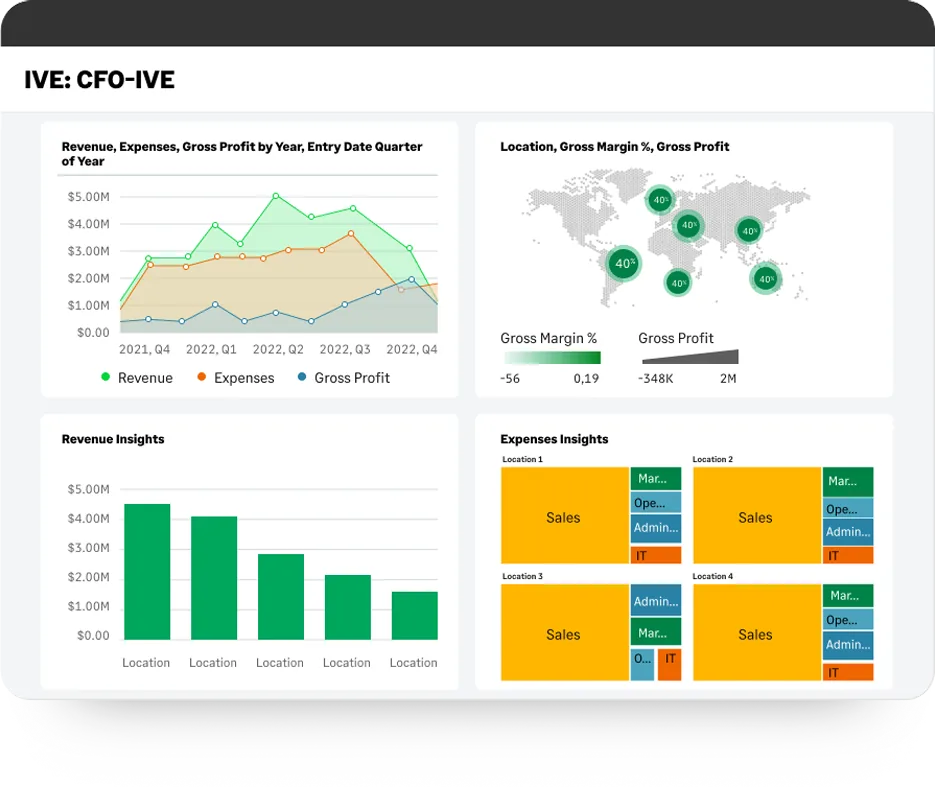
Automating the calculation is straightforward. Getting the cost-to-complete updated on a reliable cadence is the actual implementation work, and it is a change to how project managers spend their Monday, not a configuration setting. We build that step into the go-live plan with a named owner and a date, because the schedule that runs on stale estimates produces over- and under-billing positions that nobody believes and everybody stops reading.
What changes once it works is the timing of bad news. Overruns show as they emerge rather than at job close, which is the whole point. It is also uncomfortable at first, because the first honest WIP schedule after go-live often reveals a job that was quietly under water for two months. That is the system working, and it is worth warning leadership before it happens rather than afterwards.
Analysts who want to slice the resulting data without writing reports use the visual exploration tools, which pivot the same live records by job, cost code, phase or location. Our guide to the Sage Intacct Interactive Visual Explorer covers where that fits alongside standard reporting.
Governing spending against budget, and avoiding the cash surprise
The number that prevents unexpected cash flow issues is committed cost. A subcontract signed or a purchase order issued is money spent, whether or not an invoice has arrived. A job budget that shows only invoiced cost will look comfortable while the commitments exceed the line, and by then the decision that could have prevented it is months old.

Making that work requires purchase orders and subcontracts to actually be raised before the commitment is made, which is a discipline change rather than a feature. Where it holds, the budget-versus-committed-versus-actual view becomes the report the operations team runs themselves, and finance stops being asked for it. Where it does not hold, you have an expensive system producing the same partial picture as the spreadsheet. Our article on the benefits of a purchase order system makes the operational case, and the approval mechanics are covered in our piece on purchasing and purchase order approvals.
Change orders deserve their own attention during design. Unapproved change orders are the most common reason a job’s reported margin and its real margin diverge, and every contractor handles them slightly differently. Decide during configuration how pending changes are held, who can approve them and whether they appear in the projected budget before approval. That conversation is short and prevents a recurring argument.
Billing, retainage and the cash forecast
Progress billing has to match how the contract was written: schedule of values against percentage complete, cost plus with a fee, unit price, time and materials, or a mix on the same job. Standard formats including AIA-style applications for payment are produced from the same job records rather than typed into a separate document, and stored approvals travel with them.
Retainage runs on both sides and is easy to underestimate. Amounts withheld from your billings and amounts you withhold from subcontractors both have to be tracked to release, and for many contractors the retainage balance is a meaningful part of working capital. Building the release triggers into the process during implementation is what turns retainage from something chased at year end into something visible on a report.
Once billing, commitments and retainage all live in the same ledger, a job-level cash forecast becomes a report rather than a modelling exercise. That is where finance teams tend to notice the change first, because the question “will we be tight in March” stops requiring a day of work to answer.
Where construction implementations get stuck
Three patterns account for most of the rescue work we are called into on construction projects, and none of them is a software fault. Each is a decision that was postponed, handed to the wrong part of the business, or made to preserve something from the old process that was never worth preserving.
Cost code structure designed by finance alone
If the estimators and project managers were not in the room, the codes will not match how jobs are actually bid or run, and the field will code to whatever is closest. Build the structure with operations present, even though it makes the workshop longer.
Cost-to-complete treated as an accounting task
Finance cannot estimate remaining cost on a job it is not running. If updating that figure is not on a project manager’s calendar with a deadline, the WIP schedule degrades quietly and nobody notices until an auditor asks.
Converting too many open jobs
Every job in flight has to have its cost-to-date rebuilt against the new structure by hand. Contractors who insist on converting everything usually delay go-live twice. Pick a cut-off, run the smallest tail in the old system read-only, and move on.
What changes at month-end after go-live
The close itself gets moderately shorter. The reporting that follows it gets shorter by much more, because the WIP schedule, the job cost detail and the company financials become three views of the same data instead of three exercises. Taking the pain out of project financial management from start to finish is a fair description of the end state.

[DATA: Lucentive’s measured reduction in WIP schedule preparation time across recent construction implementations — Rich to confirm]
It takes a full cycle to arrive there. The second change is who asks for what. Project managers who can see their own committed cost and projected margin stop asking finance for a job report and start arguing about the numbers, which is a better use of everyone’s time. Surety and bank reporting also gets easier to produce, because the WIP schedule is generated rather than assembled.
Hear the trade-offs. Data entry gets heavier at the front end, because job and cost code have to be applied when the transaction is created rather than sorted out later. Somebody owns the cost code structure and that ownership needs a name. And the system will show you things about jobs you would rather not have known this early, which is the point but is not always welcome.
Summary
Build a better business on this platform and the leverage comes from three decisions rather than from features. Design the cost code structure with operations in the room before anything loads. Put cost-to-complete on a named person’s calendar so the WIP schedule stays honest. Raise commitments before the money is spent so the budget view is complete. Get those right and job costing, percentage of completion and the company financials come from one ledger with no reconciliation between them.
The page this post replaces offered a datasheet, an infographic, a white paper and a form, with a G2 review badge above them. Those describe capability, which is the easy part of this decision. They cannot tell you whether your cost codes will survive contact with your estimators or how many open jobs you can realistically convert.

If you are evaluating now, bring your current cost code list and a WIP schedule. Our consultants will map both to how they would be produced after implementation and say plainly which parts are straightforward and which need a process change first. Project-based businesses outside construction may also find our piece on project accounting for professional services firms useful, or you can start a conversation with our team.
Frequently Asked Questions
Is there a Sage Intacct construction module?
Sage Intacct Construction is an industry configuration of the platform rather than a bolt-on module, combining the core financials with job costing, commitments, progress billing, retainage and construction reporting. In practice that means you are implementing one system with construction-specific setup, not integrating a separate application, and the job cost and company financial views come from the same ledger.
How does it compare with Sage 300 CRE or Sage 100 Contractor?
Those are long-established construction products with deep field and payroll functionality built over many years, and both are commonly run on-premises though Sage offers hosted deployment options. The difference is architecture rather than quality: a cloud, dimensional, multi-entity ledger versus a construction-first system with its own strengths. Which one wins depends on whether your harder problem is multi-entity financial reporting or heavy field and payroll operations, and we have recommended against Sage Intacct where it was the second. Contractors who need heavy construction payroll and equipment management sometimes keep a specialist system for those and use this as the financial core. Which way that decision goes depends on your mix of work, not on a feature checklist.
Does it handle construction payroll?
Payroll is normally run in a specialist system and integrated, which is the usual arrangement for certified payroll, prevailing wage and multi-state crews. What matters for job costing is that labor cost lands against the right job and cost code with burden applied consistently. Agree that mapping during design, because a payroll integration that posts to the wrong level of detail is difficult to unpick later.
Does it replace construction project management software?
No. Scheduling, RFIs, submittals, drawings and field collaboration stay in a project management platform, and most contractors integrate the two so budgets, commitments and cost flow between them. The financial system owns the numbers and the project system owns the work. Trying to make either do the other’s job is a common and expensive mistake.
Is this suitable for a small contractor?
It depends on complexity rather than headcount. A contractor running a handful of straightforward jobs from one entity is usually well served by simpler construction accounting software, and there is no advantage in buying structure you do not need. The case strengthens with multiple entities, joint ventures, work in more than one state, or a lender and surety asking for reporting your current tools produce by hand.
What does Sage Intacct construction pricing look like?
Pricing depends on modules, user counts and entity structure, and we scope it against your actual requirements rather than publishing a range that would be wrong for most readers. Budget for three separate things: the software subscription, implementation services, and your own team’s time for cost code design and open job conversion, which is the item most often left out of the estimate.
[DATA: Lucentive’s Sage Intacct Construction software and implementation cost ranges — Rich to confirm]